Something appeared on my screen while I was in Codex the other day and I didn’t know what it was. A little animated creature, off to the side, and I don’t know which keys I pressed to bring it up. I clicked it, which made it change to voice mode and so now I couldn’t get rid of it and it was listening to me. In the end I opened ChatGPT in another window and asked how to get rid of the pet that OpenAI’s coding tool had just put on my desktop.
I only had it up for a second, really, so most of what I now know about these pets I’ve read rather than lived. But in that second I did see it do something actually helpful. Codex was working on a task and the pet was telling me its status, and my first thought was that this was actually quite good, but I still wanted it off my screen. Which is a strange place to end up, impressed and slightly panicked at the same time.
What it reminded me of, immediately, was Clippy, and I mean anyone who used Word in the late nineties has Clippy imprinted somewhere. You’d type “Dear” and up he’d pop, googly-eyed, “it looks like you’re writing a letter”, and there was no version of that sentence you wanted to hear. The other one, for me, is Navi from Zelda Ocarina of Time on the N64, the fairy that shouts “Hey! Listen!” at you until you’d quite happily mute the sound. Both of them are burned into the same place in my brain.
Clippy was switched off by default in 2002 and gone from Office by 2007, and the reasons people give for why he failed are pretty understood by now. He interrupted you when you hadn’t asked, he was hard to turn off, and he had a lot of personality and not much use, which is obviously a bad combination, because personality you didn’t ask for is just someone talking over you. Every assistant that came after was supposedly designed against those mistakes, so the rules became wait to be asked, stay easy to dismiss, and be useful before you bother being charming.
The odd part is that when I read up on what a Codex pet is meant to be, it is the opposite of Clippy on paper. It doesn’t nag, and sits at the edge of your screen as an ambient status light. The pet reflects whether the agent is running, waiting for your input, or ready for review. A red clock means it’s waiting on you to approve something, and a green tick means it’s done. People have compared it to the Dynamic Island on a Mac more than to Clippy, and the point of it is that you can glance over while you’re doing something else, which saves switching back into the app every two minutes to check whether the task has finished. It stays on top of your other windows, and it’ll carry a finished status across to another screen so you see the job is done without going looking. Click it and it listens, so you can talk to the agent without switching apps, and right-click closes it, which I know now thankfully. However you cut it, the design solved the exact problem that made Clippy hated. It only speaks in status, and it’s meant to sit in your peripheral vision, not in your face.
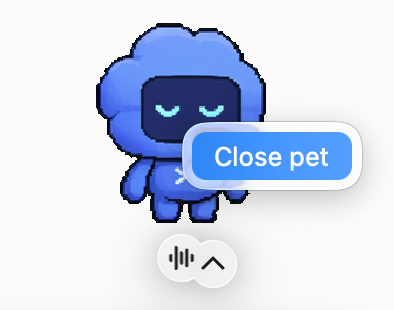
Easy to close once I knew to right-click.
Whatever it was designed to be, in my hands it was Clippy, because I couldn’t work out how to turn it off.
Someone at a hackathon I was at recently was building their own, so this isn’t only the big labs. The question underneath it is whether we actually want a character nudging us again, or whether we only tolerated Clippy and Navi because we couldn’t switch them off. These you can. You turn them on yourself with /pet, and something you chose is a different thing from a paperclip that showed up whether you liked it or not.
Something I liked thinking about is what a pet looks like for software that isn’t fun. A coding tool’s audience will happily hatch a custom sprite, and Claude has its little crab. But what is the pet for Excel? Word had Clippy, so a spreadsheet is the fair test. I genuinely don’t know if a cheerful animal telling you a calculation finished is helpful, or the single most annoying interruption you could put in front of someone with a spreadsheet. A companion feels wrong for software whose whole job is to be boring and reliable, and yet a status light for a long-running operation is arguably exactly where an ambient nudge earns its place.
Here’s the part that actually settles it, though, and I only found it after I’d turned mine off. People have already rebuilt Clippy as a Codex pet. He’s in the community galleries, next to a pixel-art Sam Altman and the Finder smiley face and a load of cartoon characters, on fan sites set up specifically to catalogue them. So the answer to “is Clippy going to make a comeback as a pet” is that he already has, literally, made by the people using the tool rather than by any company deciding to bring him back. We didn’t kill him and move on. We spent two decades learning why he didn’t work, shipped something built on the opposite principles, and the users’ first move was to bring the paperclip back.
The further I read, the more the pet looks like a glorified status screen, and once I saw that I stopped being against it. A running, waiting, done light is useful when an agent spends half its time waiting on you, and people have already built the un-cute version, the menu-bar meters and quota widgets that do the same job without a face. The pet is that with a character on top. Put like that I’d have one, and mine would be a corgi, because I love a corgi and see no reason to pretend otherwise.

The pet is a status screen with a character on top.
The catch is where it lives and what it costs. On my laptop, one screen, a pet sitting over my work takes up room I actually need, so I wouldn’t want it overlaid. On its own little side-screen next to the usage stats and the message log, a corgi telling me a task finished, that I’d happily have. What I’d want to watch is the token burn. Someone has already built a pet that feeds on your token consumption and grows the more you spend, which is a cute idea and also exactly the sort of concept that gets you spending without noticing. A status light I’d take, but with an appetite I’d want to keep an eye on it.