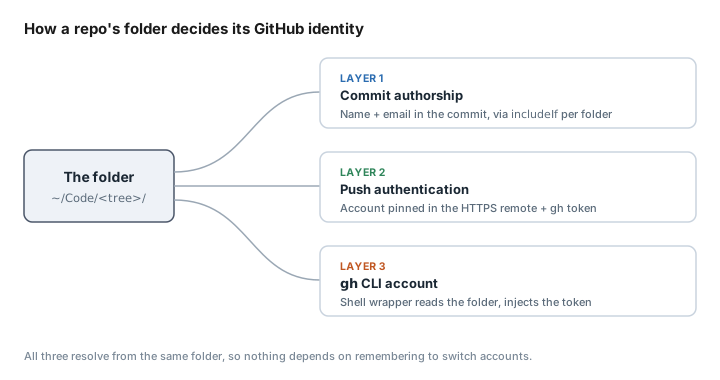
TL;DR. Two GitHub accounts on one machine, routed entirely by which folder a repo lives in. Three problems, three fixes:
| Problem | What it decides | Solved by |
|---|---|---|
| Commit authorship | The name and email stamped into the commit | includeIf, routed by folder (Layer 1) |
| Push authentication | Which account’s credentials talk to GitHub on push | Username pinned in the HTTPS remote + gh token (Layer 2) |
gh CLI account | Which account gh pr create and gh repo view act as | A shell wrapper that reads the folder (Layer 3) |
All three route by folder, so nothing depends on remembering to switch accounts. It’s HTTPS with gh-managed tokens throughout and no SSH keys. The steps are below, and the reason for dropping SSH is at the end.
What you need first
- A Mac
- Two GitHub accounts
- git 2.13 or newer, for the
includeIfdirective - The
ghCLI installed, with both accounts logged in (gh auth loginonce per account; the tokens live in the macOS keyring)
Everything below assumes a folder layout under ~/Code, one directory per identity.
The commit that went out under the wrong account
I run two GitHub accounts on this Mac. One is thekashifnazir, the public account tied to work I want people to see; the other is a personal account for experiments and drafts, which I’d rather keep off public repositories. The first time it went wrong, I merged a pull request with a commit in it authored by the personal account, on a public repo where I didn’t want that account attached. I’d been working in the right folder the whole time. Folder config had set the commit author correctly on paper, and the commit still went out wrong, because commit identity is only one of three things that decide which account you’re acting as. This is the setup I landed on to fix that, verified end to end on my own machine, with the real paths under ~/Code.
Why folder config isn’t enough
Folder config so obviously handles commit authorship that it’s easy to assume it handles the rest. It doesn’t. The commit I merged had the right folder and the right push auth. What it didn’t have was the right gh account.
That’s the one that catches people, because gh’s active account is global. It’s a single setting for the whole machine, so switching it in one terminal switches it in all of them, including the headless shells that coding agents run in.
And it isn’t a thing you can just be careful about. The GitHub CLI team has it filed as an open request, so it isn’t solved upstream, which is why the gh wrapper in Layer 3 exists.
Layer 1: commit identity, routed by folder
Git 2.13 added conditional includes, which let the global config pull in a different identity file depending on which directory a repository sits in. The whole of commit authorship is solved here, and it’s the layer that would have caught my bad commit on its own if the other two had been in place.
First, create a directory per account under ~/Code. Mine are ~/Code/showcase/ for public repos tied to the public account and ~/Code/personal/ for the personal one; use whatever names you like, as long as they match the paths in the config below.
1. Create one identity file per account. I keep mine in ~/Code/tools/git-identities/, one file per account. These examples use generic values; replace the name, username, and noreply address with the values shown in each account’s GitHub email settings.
[user]
    name = Your Name
    email = [email protected]
[user]
    name = Your Name
    email = [email protected]
Use a GitHub noreply email for anything public: it keeps your real address out of public commit metadata, and GitHub still attributes the commit correctly. The only cost is that the noreply form reads as less human outside GitHub.
2. Route to them from the global config. In ~/.gitconfig, point each folder tree at its identity file:
[includeIf "gitdir:~/Code/public/"]
    path = ~/Code/tools/git-identities/public.gitconfig
[includeIf "gitdir:~/Code/personal/"]
    path = ~/Code/tools/git-identities/personal.gitconfig
The file and folder names are examples. Change them to match your own directory trees, keeping each path consistent between the identity file and ~/.gitconfig.
3. Mind the trailing slash. The / on the end of each gitdir path is load-bearing, and without it the match silently fails. You don’t find that out until a commit lands under the wrong name.
Test it. In a repo under either tree, run git config user.email. It returns that tree’s identity, with no per-repo setup. A fresh git init in either tree is born with the right name and email before you’ve done anything.
Two things make this safe to add on a machine that already has repositories on it. Repo-local config beats the include, so any repository with a per-repo identity already set is left untouched. And because a new repo picks up its identity at git init, there’s nothing to forget to set.
Layer 2: push auth, with the account pinned in the URL
Commit authorship is sorted, but pushing is a separate decision, and it’s the one my bad commit got right by luck rather than design. Both accounts stay logged in to gh at once (gh auth login once per account), and you pin which one authenticates a given repository in its remote URL.
1. Put the account in the remote URL. Carry the username in the remote so the repo authenticates as that account. On a fresh clone:
git clone https://[email protected]/your-public-username/repo-name.git
On a repo you already have, rewrite the existing remote:
git remote set-url origin https://[email protected]/your-public-username/repo-name.git
The embedded username selects which logged-in account authenticates that repository, whichever account is globally active.
2. Register gh as the credential helper. Run gh auth setup-git once. In a normal terminal that’s the end of it, and pushes use the account pinned in the URL.
3. Handle the headless case (skip until you need it). You only need this if you’ll push from CI or an agent shell; for normal terminal use, skip it and come back when a push fails with could not read Password. In a headless context, which is to say CI or the sandboxed shell an AI agent runs in, the keyring-backed helper returns nothing and the push dies, even though gh auth token works fine in the same shell. The fix is a repo-local credential helper that fetches the token at push time:
git config --add credential.helper ''
git config --add credential.helper \
  '!f() { printf "username=%s\npassword=%s\n" your-public-username "$(gh auth token --user your-public-username)"; }; f'
The empty first line resets the helper list, and so the second one pulls the right token per push. Replace your-public-username with whichever account owns the repo.
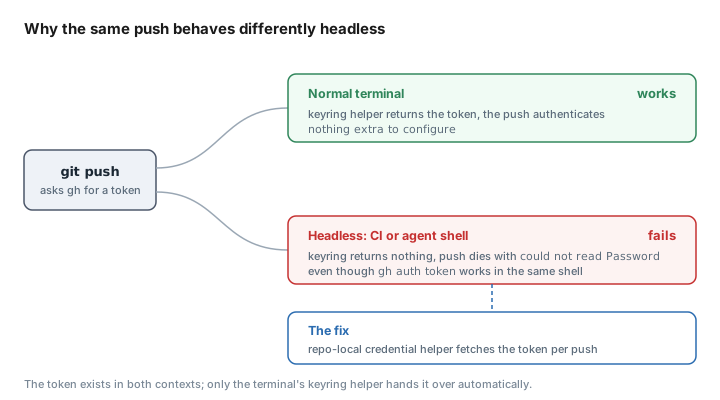
Test it. git push from the repo should authenticate as the pinned account in a normal terminal, and the credential-helper block makes it behave identically in a headless shell. That’s the change that lets me run agent sessions across different repositories at the same time without them contaminating each other, because each one pushes as the account its folder resolves to instead of failing or landing under the wrong name.
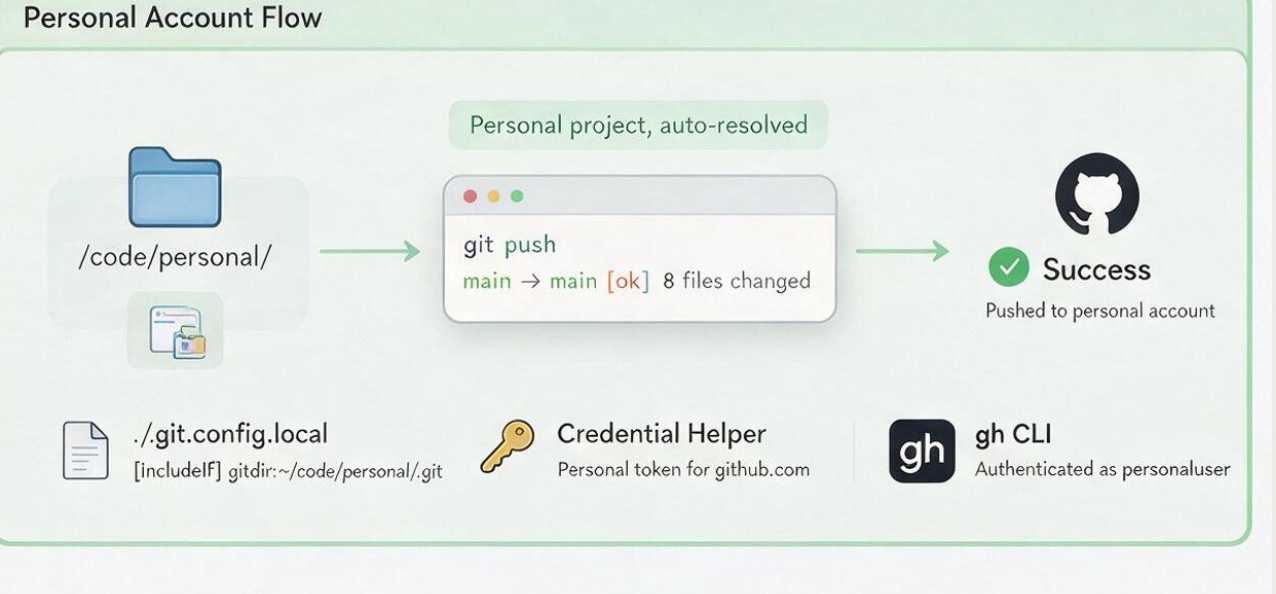
A repository in the personal tree resolves to the personal account without a manual switch.
Layer 3: making gh follow the folder
gh holds both logins but only one is active at a time, and that global active account is the thing folder routing hasn’t touched yet. GH_TOKEN in the environment always beats the active account, so a shell wrapper works out the right account from the repository and injects the token before handing off to the real gh. It resolves in order: the username pinned in the remote URL, then an owner-to-account map for org repositories where the owner can’t be inferred, then the folder tree for repositories that have no remote yet. If none of those match it falls through to the active account, unchanged.
1. Add the wrapper to your shell. Put this function in your ~/.zshrc (or ~/.bashrc):
gh() {
  local url user owner token
  if url=$(command git remote get-url origin 2>/dev/null); then
    # 1) username pinned in the remote URL
    user=$(printf '%s' "$url" | sed -n 's#^https://\([^@/]*\)@github\.com/.*#\1#p')
    if [ -z "$user" ]; then
      # 2) repo owner -> account map (org repos can't be inferred, hence the map)
      owner=$(printf '%s' "$url" | sed 's#\.git$##; s#.*[:/]\([^/]*\)/[^/]*$#\1#')
      case "$owner" in
        your-public-username) user=your-public-username ;;
        your-personal-username) user=your-personal-username ;;
      esac
    fi
  fi
  # 3) directory-tree fallback: covers repos with no remote yet
  if [ -z "${user:-}" ]; then
    case "$PWD/" in
      "$HOME/Code/public/"*) user=your-public-username ;;
      "$HOME/Code/personal/"*) user=your-personal-username ;;
    esac
  fi
  if [ -n "${user:-}" ] && token=$(command gh auth token --user "$user" 2>/dev/null); then
    GH_TOKEN="$token" command gh "$@"
    return $?
  fi
  command gh "$@"
}
2. Fill in your own values. Replace your-public-username and your-personal-username with your two account names, in all four places, and change the two ~/Code/ paths to whatever your folders are actually called.
3. Know which line you’ll keep editing. The case "$owner" block in the middle is the owner map. It’s the one part that isn’t set-and-forget: when you start pushing to an organisation whose name doesn’t match either account, add a line for it there.
4. Reload the shell. Run source ~/.zshrc before the wrapper takes effect.
Test it. In a repo under your public tree, gh repo view should act as your public account without any gh auth switch. Do the same in a personal repo and it acts as the other account. That’s the whole point: nothing depends on remembering to switch anything.
One caveat with the wrapper. A shell function doesn’t reach scripts, so anything non-interactive has to fetch its own token with GH_TOKEN=$(gh auth token --user your-account-username). That’s the seam the credential helper in Layer 2 covers for git, and scripts calling gh need the same treatment.
Checking the whole thing
With all three layers in, the check that ties them together is to open a repo under your public tree and run git config user.email next to gh auth status: the first shows the public noreply address, the second shows gh acting as the public account, no switching in between. The one case worth knowing about is outside any repository, where gh falls back to whatever account is active. That’s the one spot the folder can’t speak for, and it’s the behaviour you want left alone.
The SSH version, and why I stopped using it
The earlier version of this ran on SSH, one key per account with a github-showcase host alias. It mostly worked, and then it bit me in a way worth naming because it’s the whole reason I moved. I’d pinned the showcase key with IdentitiesOnly=yes, believing that meant only this key. It doesn’t. It restricts SSH to configured identities, but that includes identities inherited from a matching Host github.com entry in ~/.ssh/config, which offered my personal key first. The key was right, and GitHub still authenticated as the wrong account, and a private repo failed with Repository not found.
That’s why the whole setup is HTTPS with gh-managed tokens now. Three things make it the better base for multiple accounts:
- There’s no key-offer order to get wrong, which is the failure that moved me.
- The authenticating account is visible per repo in
git remote -v, where SSH leaves it implied by config you have to reconstruct. - It works in headless shells, so CI and coding agents push as the right account instead of dying on a missing credential.
What it doesn’t cover
Two things are still on me rather than on the setup. Scripts need their own token line, as above, because the wrapper can’t reach them. And organisation repositories can’t be inferred from the URL, so each one needs a line in the owner map by hand. Neither is solved, they’re just known, and for a machine I actually work on that’s a fair place to leave it. The next thing would be a stamp script that pre-wires all three layers on every new repository so none of this has to be remembered, which is half-built and not something I’d hand anyone yet.