I was on site during a Windows 10 migration about eight years ago, and the group I’d cut over the previous day started coming to me with the same problem. They were opening files they’d opened the day before, and now some threw an error about a missing font and refused to open at all. Others opened with chunks of text gone, or the formatting pushed out of shape.
The characters in those files were never damaged. Every letter was sitting there in the PDF and the file itself was fine, which is why the same documents opened without complaint on a machine that hadn’t been touched yet. What was missing was what turns those characters into shapes on a screen.
Mixfont’s Decoy Font turns the gap between characters and their rendered shapes into the experiment.
Mixfont released a typeface last week called Decoy Font that does this on purpose, and it’s the first thing I’ve seen that treats the gap as a feature. Eric Lu, who runs it, builds each character out of two layers at different spatial frequencies, a sharp thin outline on top and a blurred low-frequency mass behind it, so which message you get depends on how you’re looking at it. It’s the Einstein and Monroe illusion applied to letterforms, and the pitch is that a vision model reading pixels up close locks onto the sharp outline and reports the wrong text. Their own tests had GPT Sol and Gemini 3.5 with Thinking both returning the decoy.
I made one in their playground with MAKE LISTS as the decoy and KASH ROCKS underneath it. I could read the hidden message without much effort, and when I asked Claude what the image said it came back with MAKE LISTS twice, on the original and on a screenshot, which is Mixfont’s result reproduced. Then I ran the original file through Google’s OCR in Keep, and through Shottr on the Mac. Both came back with KASH ROCKS.
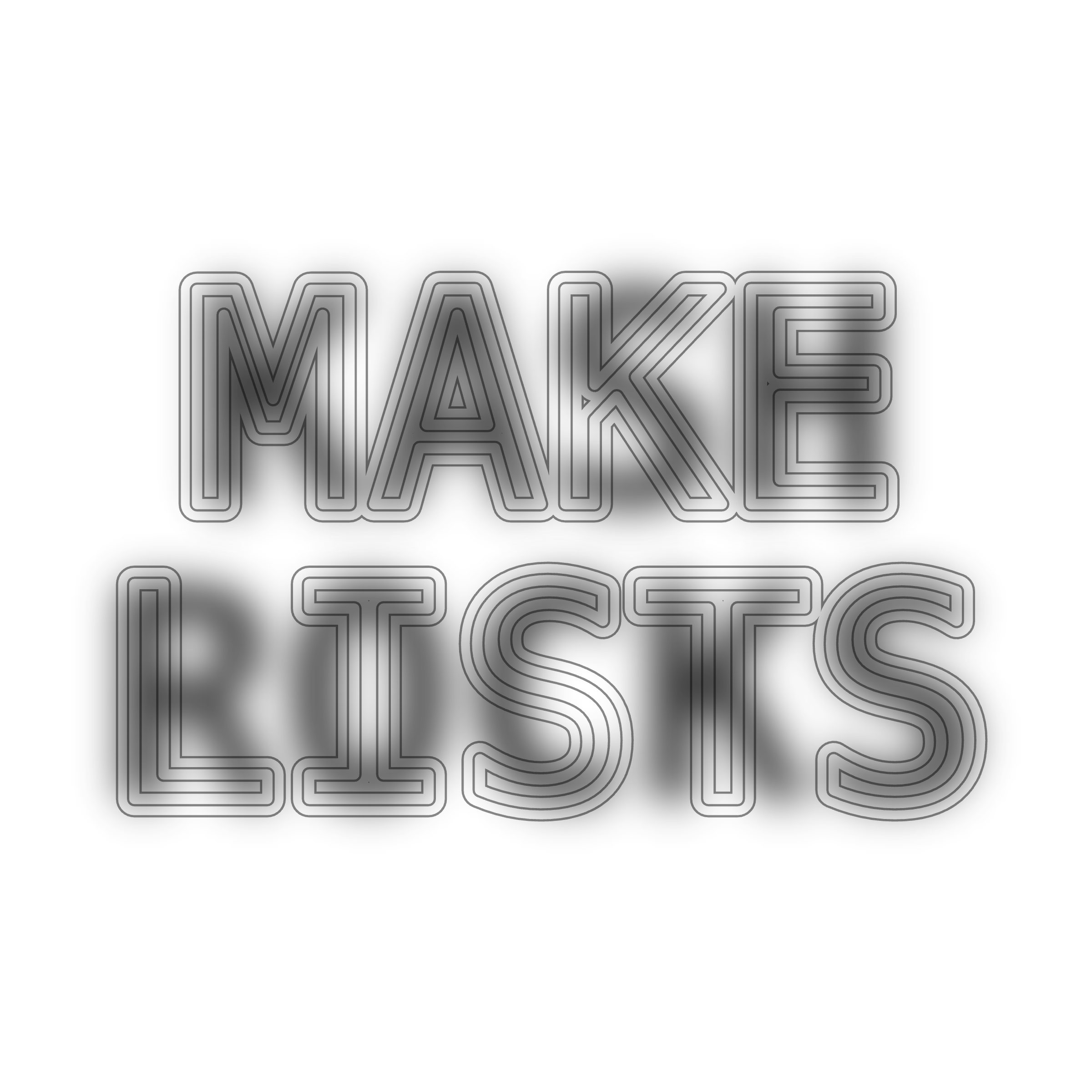
The playground image I tested: MAKE LISTS in the outlines, KASH ROCKS in the blurred layer.
Mixfont’s page says the technique protects against AI or OCR, but every test they show is a frontier model, and the two ordinary OCR engines I tried read the hidden layer straight out of the file with no resizing and no prompting. One string and three readers isn’t a study, so I’d hold this loosely. Lu is upfront that none of this is a guarantee, though the failure he describes is a capable agent with code execution working the trick out, which isn’t what happened here. The older, dumber tools were never doing the process the defence was built against in the first place. Whether a given reader gets the decoy or the message turns on how it handles pixels before it does anything clever, and that isn’t something you can tell from outside it.
The font ships as a normal TTF built on DejaVu Sans Mono, free for commercial use, and text set in it copies out as the real characters, so the words were never hidden at all. Anything reading the character stream gets them, and only something reading a picture of them gets the decoy. The protection is entirely in the drawing, which is the same place my users lost their documents in 2018, coming at it from the other side.
Lu’s next idea is to extend it to Chinese, where he thinks the characters being closer in size and shape would hide a message better than Latin letters do.