The biggest change I made for this AWS recert isn’t which AI I’m using, it’s that I moved my study notes out of OneNote and into Notion.
Back in March I wrote about studying with custom GPTs for the AI Practitioner. The note-creation GPT had grown a system prompt that read like a software spec, the coaching one had stayed simple and useful, and the post ended with me saying I’d try Claude as a study partner for the SA Pro and figure out whether to move my notes out of OneNote.
OneNote was always good enough for what I wanted, and there was no reason to switch. I’ve flirted with Notion for years for other things without ever committing because nothing about the AWS notes specifically made it worth the effort, and the reason this time was the AI. Notion is markdown with an API, which means Claude can read and edit the page where the notes actually live, and OneNote can’t. Every interaction I had with the note GPT in March involved me copying output from one window into another, and that bridging was where the time went.
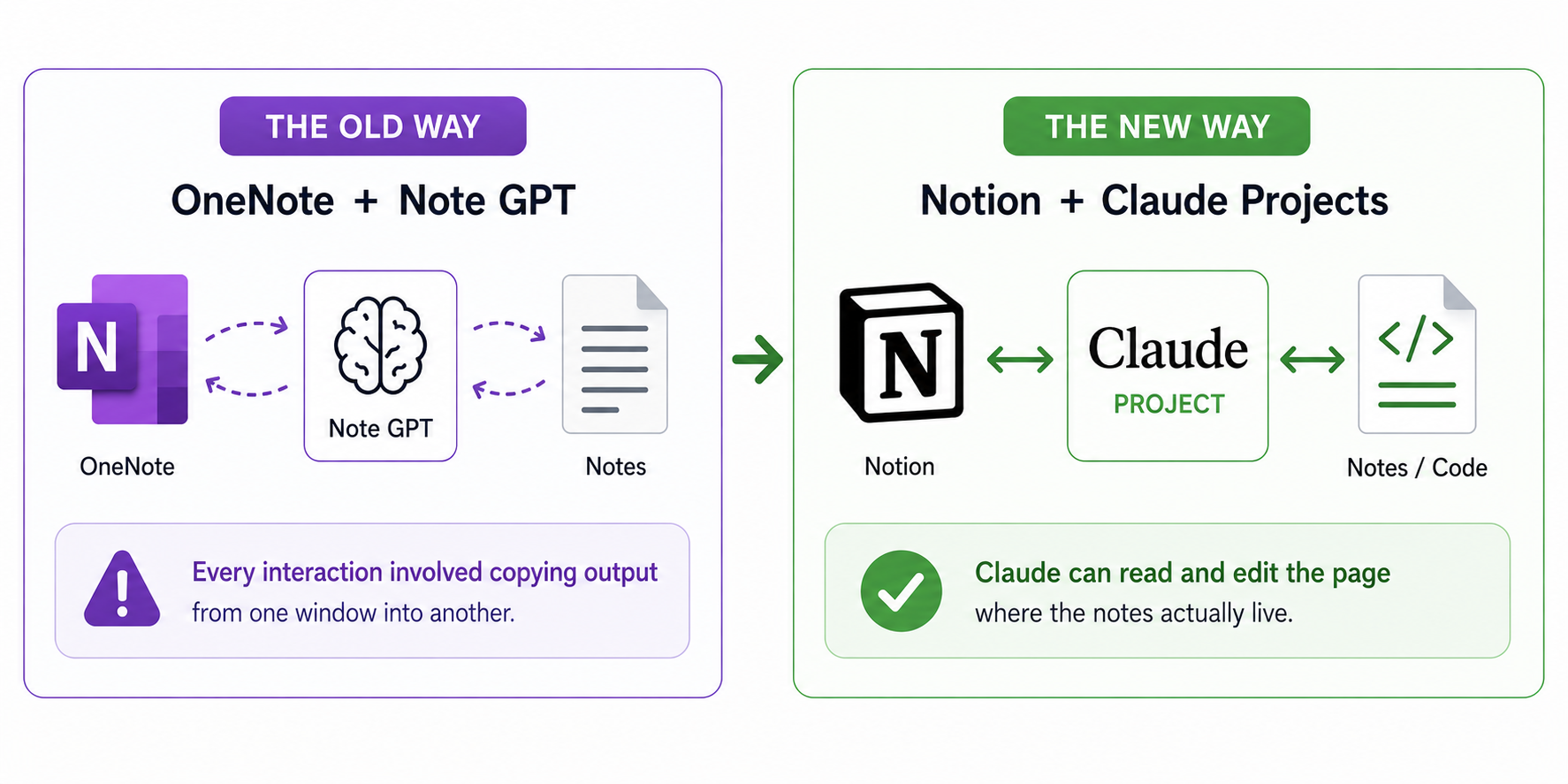
The change that mattered was removing the copy-paste bridge between where the AI worked and where the notes lived.
The university version of this is that I started in years where you didn’t get the slides, then they started handing them out, and eventually they put them online ahead of the lectures. The notes I made changed completely as that happened. Studying with AI in OneNote was the early-years version where I was the one doing all the transcription. Notion is the later-years version where I can listen and only catch what matters.
The project setup
With the platform sorted, the question moved from how to get content out of the AI to how to make sure what came out matched how I actually take notes. My notes are deliberately uneven, with dense slash-separated facts in continuous blocks, bold headings, and exam questions inline with the answer right under them, and more on what’s hard but almost nothing on what clicked first time. The format reflects how I revise, which is by scanning for the things I know I get wrong.
The note GPT in March kept drifting back to clean structured headers and uniform service summaries no matter how many rules I added, and the system prompt grew until it read like a specification document for a tool I didn’t want to build. Some of that was the format being unusual, and some of it was that the model’s defaults pulled toward something cleaner than what I write, so the rules were trying to override defaults rather than work with them.
Claude has a feature called projects, which is the equivalent of custom GPTs in ChatGPT. The project for SA Pro has the IAM block embedded as the actual style target rather than described:
AWS IAM / Global service / Controls AWS resources only / non-explicit deny for new accounts /
User is a permanent named / group is a collection of users / Role is the authentication
method / permissions are applied to user, group or role, set in policy docs (JSON) /
console passwords, access keys (access key identifier and secret access key) and server
certificates / access keys should be rotated for IAM users / IAM:PassRole needed to
assign a role to an AWS resource (EC2)
Source priority is locked down, with the Maarek slides as primary, AWS exam guides for scope, and AWS docs only when something looks off. There are two trigger modes so it doesn’t switch behaviour without being asked, one for notes updating and one for coaching. There’s also carried memory of the things that wasted time previously, like the fact that the Notion connector can’t upload images, so any work that involves diagrams needs me to drag them in by hand. None of that is an AI feature tour, it’s a workspace built around the things I already knew would otherwise go wrong.
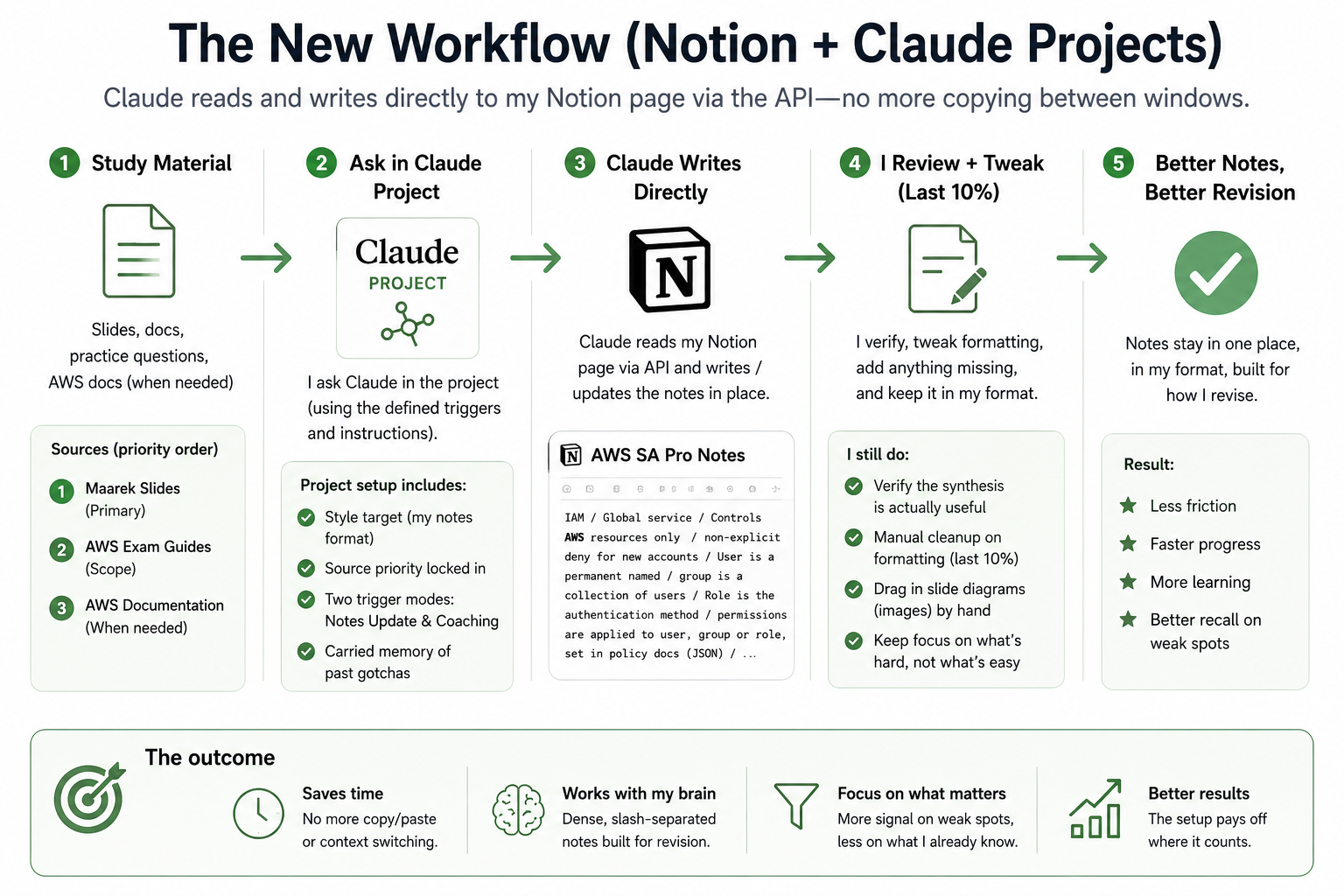
The working loop now has the source material, project instructions, and notes page in the same flow.
What it cost to build
Building the baseline took multiple sessions on Opus, Claude’s heavier model. I went with Opus rather than the lighter Sonnet because there was a lot of context to hold across slides, my style reference, and the running notes page in Notion, and I wanted it done right rather than fast. I’m on the standard Claude Pro account and the usage caps meant a few batches of dense note-writing would burn through the limit quickly, so I had to wait for the usage window to reset before continuing each time. ChatGPT picked up other work during the gaps because I keep both subscriptions running, but the AWS notes themselves were entirely Claude. The work covered both the Associate and Pro course content because Pro builds on Associate and I do both courses every recert cycle. Actually writing the notes by hand would have taken about the same time on the clock as letting Claude do it across multiple sessions, but the AI doing the work asynchronously meant I got that time back for other things.
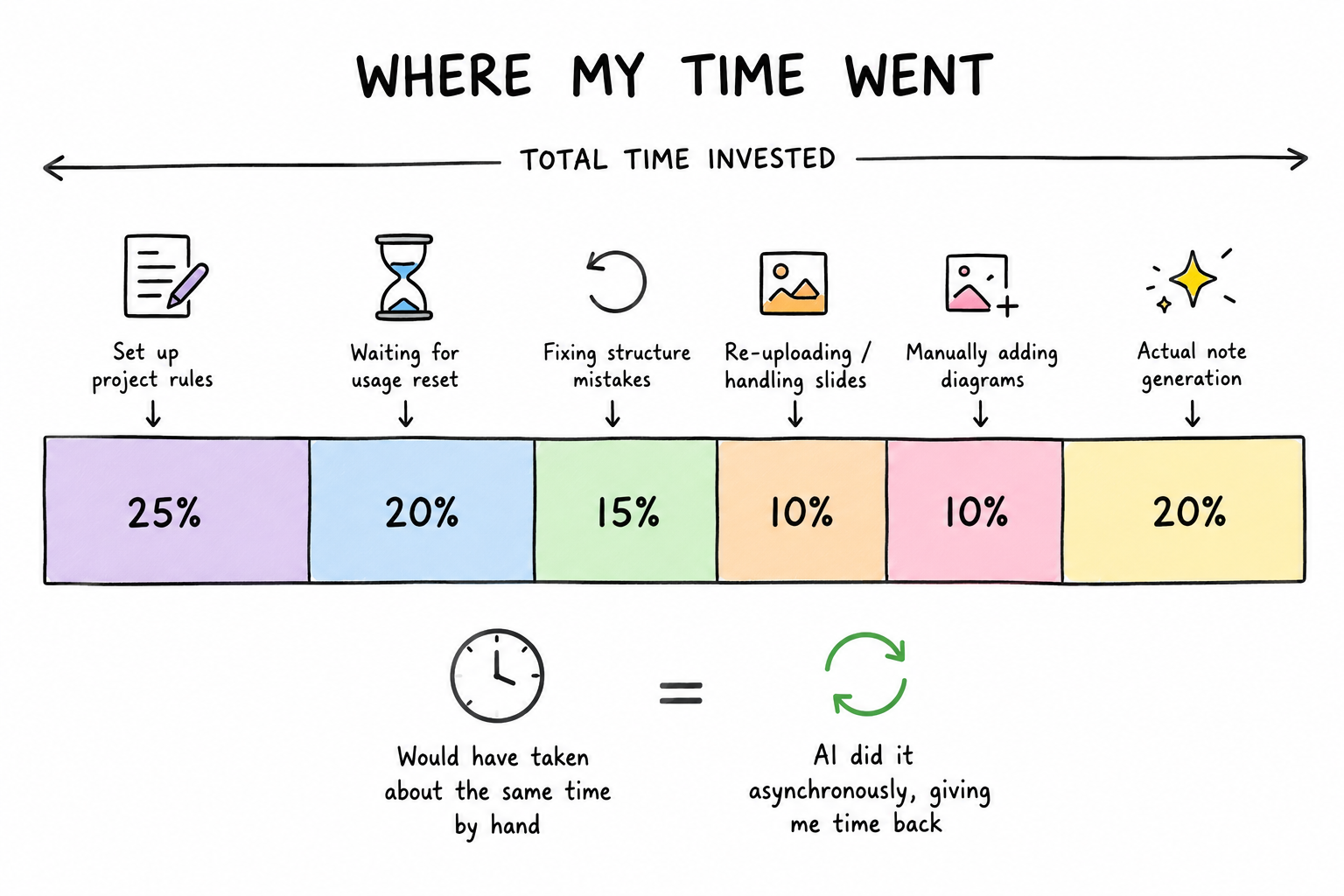
The clock time was not magic. The useful part was that a lot of it happened asynchronously instead of taking my focus.
I caught it dumping new Pro content at the end of the page partway through the Pro pass, when the project instructions had been clear that Pro content should fold into the existing Associate sections so each topic sat together. It then had to undo what it had written and redo it the right way, which cost about a third of a session by itself. The takeaway wasn’t about Claude getting it wrong, it was that I’d written the project rules upfront based on how I thought it would work, and there were edges I only saw once notes were getting written. Once Opus had done the heavy context-processing for the baseline, I moved subsequent work to Sonnet, the lighter Claude model, because by then I knew what I wanted and didn’t need the heavier model for execution.
The slide PDFs had been compressed before upload to fit the project limits, and partway through the work it became clear the compression had stripped the images out entirely, leaving text-only extractions. Claude flagged where it thought diagrams should sit and asked me to drop them in from the original slides, which I’d have had to do anyway because of the connector image limitation. I picked the option of accepting the manual step and moving on rather than spending time finding another way to get the images visible to the AI, because falling down another tool-configuration hole was exactly the trap I’d been trying to avoid in March. There’s likely a better way to handle slide images that I’ll look at after the recert is done, but during the studying itself it wasn’t worth the time.
Where it justified itself
The setup justified itself the first time I hit a topic I always get wrong. Private versus public Virtual Interfaces in Direct Connect is one of those things I lose every Pro cert cycle, where I know they’re different and roughly which one does what, but by the time the question is in front of me I’m guessing again.
I dropped the practice questions and the AWS explanations into the project and ran phased passes through them, surfacing the deciding factor first and then collapsing it back into the format I actually read. What came out was the distinction in my notes the way I’d have written it myself, with the deciding factor stated plainly, the exam question dropped inline, and the answer underneath. It went straight into the page.
That’s now how I work through every weak spot from practice exams. The AI isn’t producing anything I have to clean up before I can use it.
PrivateLink for S3 with Direct Connect: Private VIF → PrivateLink → S3 Interface VPC Endpoint / VPC Endpoints + PrivateLink work across VPC Peering including cross-region
What I still do, and the thing pulling me back to design
I still verify what comes out is actually useful, because the synthesis sometimes collapses something I wanted kept. There’s manual cleanup on formatting that wants the last ten percent done by hand, and the slide diagrams I drag into Notion myself because of the connector image limitation. The speed-up over March comes from a few things at once, including Claude being a better fit for this kind of dense non-uniform output, the Notion shift letting the AI write where my notes live, and the time between certs where I’ve got better at directing these tools.
What I wasn’t expecting is what’s happening as I work through the Pro modules rather than the Associate refresh. I’m on the API Gateway and event-pattern material now, and there’s an event-driven pipeline I built in Azure a while back that I keep glancing at differently as I go through the slides. The way the Pro course lays out the patterns, and I’m halfway through redesigning the thing in my head for AWS before the recert is even done.
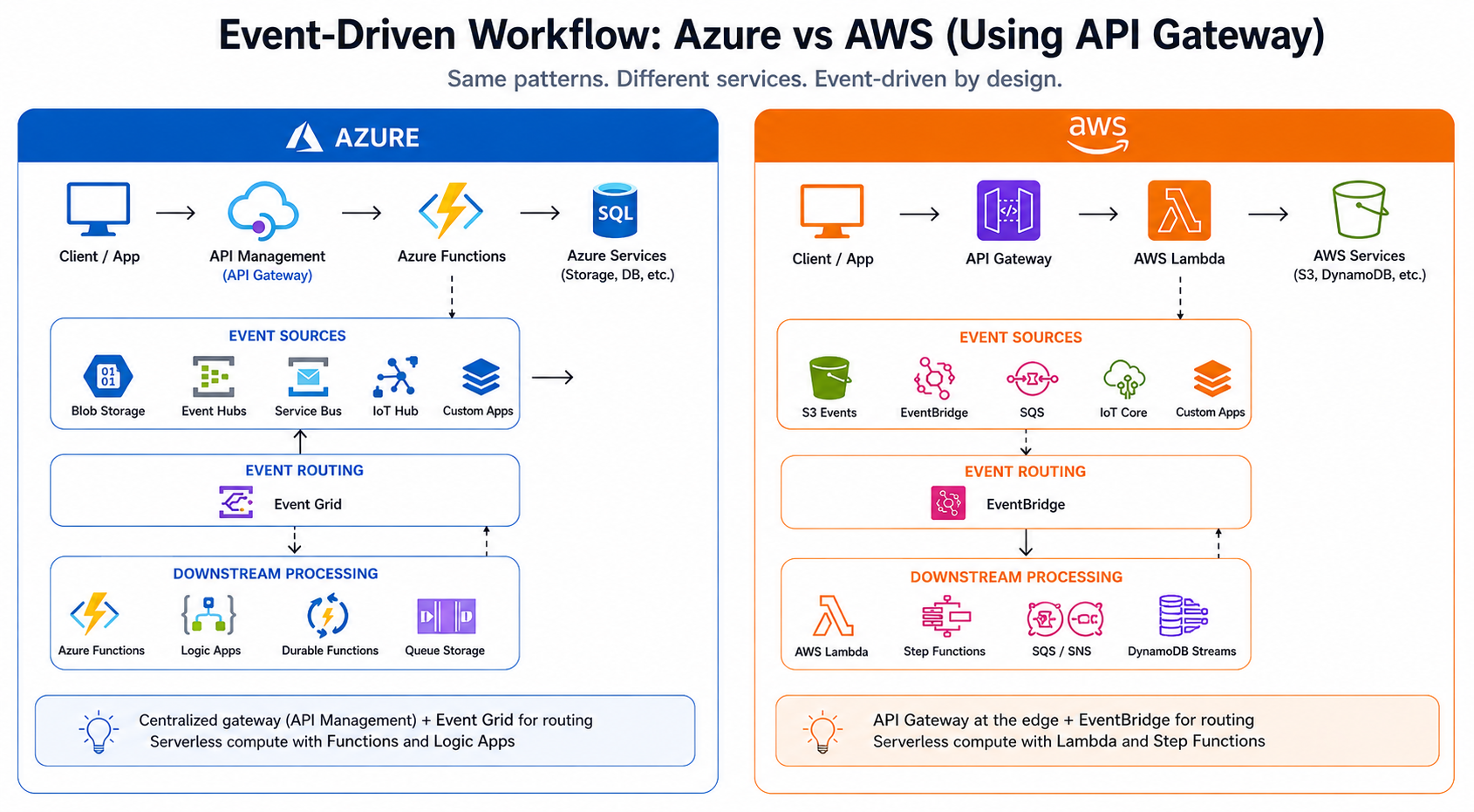
The redesign in my head is less about copying services and more about translating the event pattern into AWS primitives.